Campus Voice
Raise campus problems anonymously, and get them fixed
Campus Voice is the part of VarsityKotha where students report what is wrong on campus, the most shared problems rise to the top, and your university replies in the open.
Get it on Google Play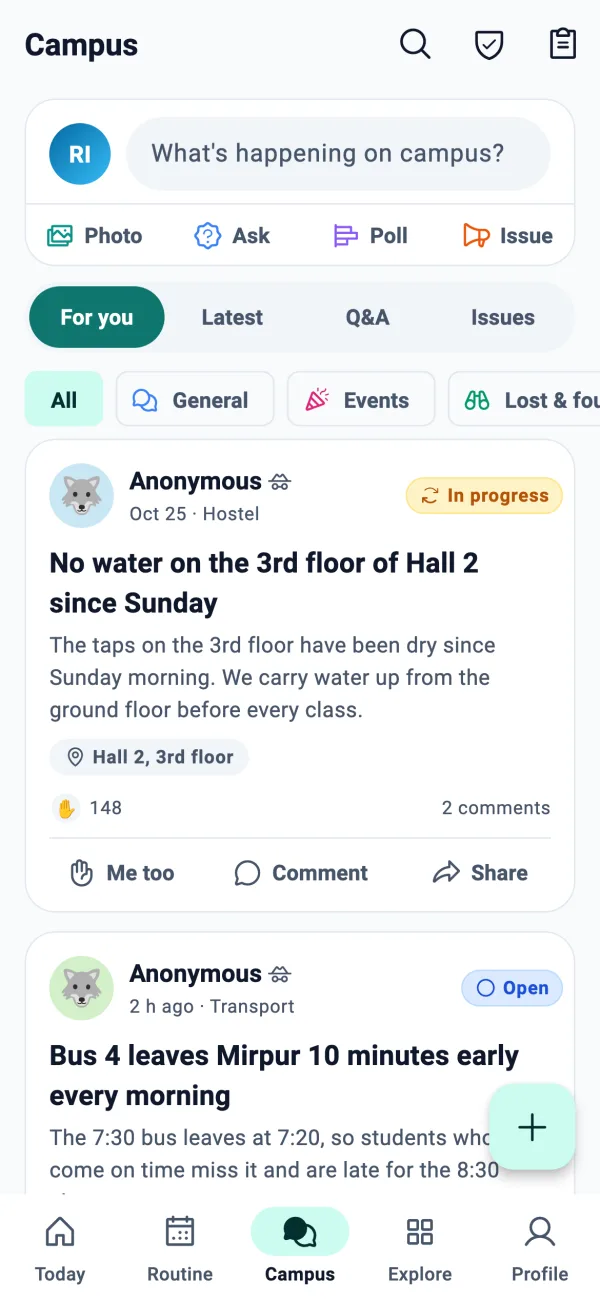
How Campus Voice works
Post a problem
Pick a category (classes, halls, transport, food, Wi-Fi, safety and more), write a title and details, add up to 4 photos and an optional place such as “Library, 3rd floor”.
Anonymous by default
No one can see who wrote a post, not other students and not your university. You can choose to post with your name if you want to.
Me too
Others tap Me too when they face the same problem, so the issues that affect the most students rise to the top. Votes are counts, never names.
Official replies
Officials of your own university reply in the open and move the issue through Open, Acknowledged and In progress to Solved, so you can see where it stands.
Similar issues first
Before you post, the app shows similar issues that already exist, so students join one strong voice instead of ten scattered posts.
Moderated and safe
Posts are checked, photos are cleaned of location details and checked for unsafe content, and you can report anything abusive.
From problem to solved
- 1
Open Campus Voice
Browse the feed of your university: Trending, New or Solved, with search and category filters.
- 2
Post or add Me too
Report something new, or add Me too to a problem you also face. You can follow an issue to hear about updates.
- 3
Officials respond
Authority accounts set by your university reply in public and change the status as work happens.
- 4
See it solved
You get a notification when the status changes or someone replies. If a solved issue comes back, the author can reopen it.
How anonymity is kept
The app has a “How anonymity works” screen that explains it in plain words. The main points:
- Posts and comments are anonymous by default
- Comments use a handle that is new for each issue, like “Student 7KQF”, and the author of the issue is marked “Author”
- Moderators can hide a post or block an author without ever learning who they are
- Safety reports are private: only the author, moderators and your university's authorities see them, and they never appear in the feed
Frequently asked questions
Can my university see who posted?
No. Posts are anonymous by default: other students and your university see no name. If you choose to post with your name, it is shown, so the choice is yours.
What kinds of problems can I raise?
Classes, halls, transport, food, Wi-Fi, safety and other campus matters. There is a category list in the app.
Who replies to the posts?
Authority accounts of your own university. They are set up by our team for the university, they reply in public and update the status.
What does Me too do?
It tells everyone that the problem affects you too. The more Me toos, the higher it rises, and it shows only a count, never who tapped it.
What about serious or safety issues?
Safety reports are private. Only the author, moderators and that university's authorities can see them, and they are not shown in the feed. For an emergency, contact the police or your university's security first.
Is it moderated?
Yes. Text and photos are checked, anything can be reported, and a moderation team can hide posts or block abusive authors. Every staff action is logged.
Is Campus Voice free?
Yes, it is part of the free VarsityKotha app.
More from VarsityKotha
Make your campus hear you
Install VarsityKotha, sign in with your university email and raise the problem everyone has been complaining about in the corridor.