University bus
University bus times, and where the bus is right now
See every stop of your campus bus routes and the next bus from yours. Students on a bus share where it is, so you can see it coming and leave at the right time.
Get it on Google Play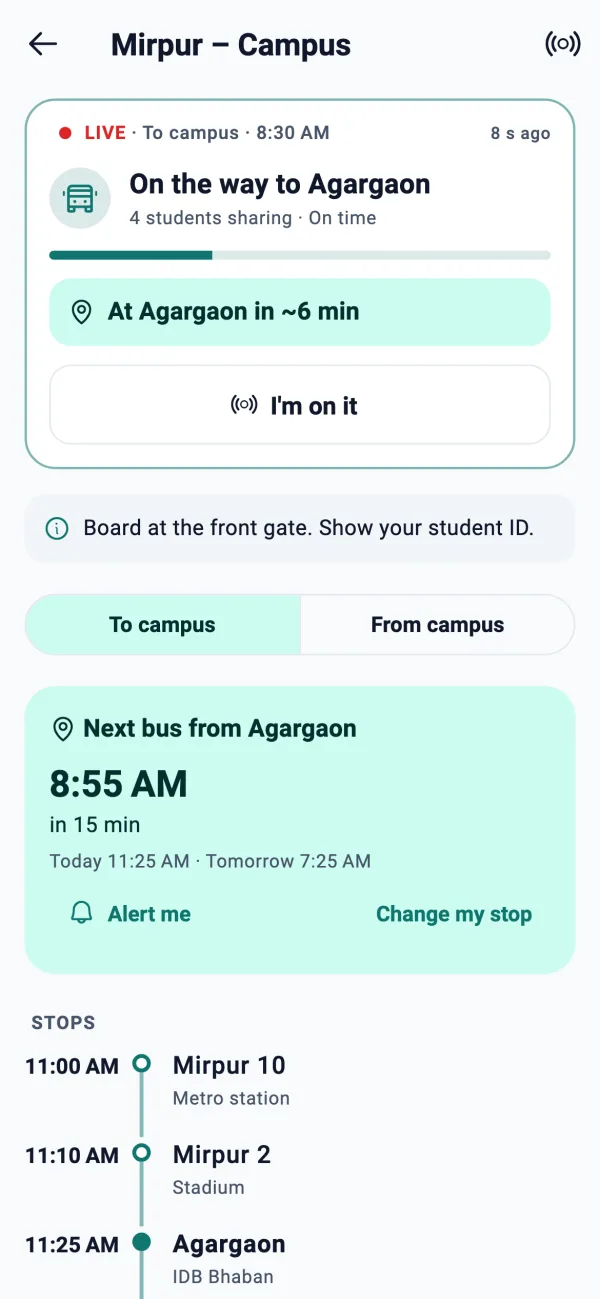
What you get
Routes and every stop
Open a route to see all its stops in order, with the timetable of each trip, to campus and from campus.
The next bus from your stop
Pick your stop and the app shows the next bus from it, instead of leaving you to read a long timetable.
The bus, live
When a student on the bus is sharing, everyone on that route sees the bus move and an estimate of when it reaches their stop.
A notification when it is close
Set an alert for your stop and get one notification when the bus is a few minutes away, once per bus.
One-tap trip feedback
After a trip, riders say in one tap how it went. Over time this shows how each trip really runs.
Built by riders, for riders
There is no driver app and no hardware on the bus. It works because students on the bus choose to share.
How the live bus works
- 1
A rider starts sharing
A student on the bus taps Share from a screen that says exactly what is sent and who sees it.
- 2
The route sees the bus
Everyone on that route sees the bus position and the time it should reach their stop.
- 3
You get a notification
If you set an alert, the app notifies you once when the bus is close to your stop.
- 4
The trip ends
The shared location stops, and riders can say how the trip went.
Privacy for the students who share
Sharing is optional and always started by hand. The rules are built into the app:
- Location is sent only while a student shares, and a notification stays up while it runs
- Other students never see who is sharing, only that the bus is moving
- Raw location points are deleted 24 hours after the trip ends
- Students of other universities never see your campus's buses
Frequently asked questions
Where do I find my university's bus schedule?
Open Bus routes in the app. Routes show every stop and the timetable of each trip. Routes are set up campus by campus, and the page shows the buses of your own university.
How does live bus tracking work without GPS devices?
Students riding the bus choose to share their phone's location. The app combines it into the bus's position on the route. There is no driver app and no hardware.
Will I be notified when the bus is near?
Yes. Set an alert for your stop and the app sends one notification when the bus is a few minutes away.
Can other people see who is sharing?
No. Other students see only the bus moving, with counts, never a name or a single person's track.
How long is location data kept?
Raw location points and sessions are deleted 24 hours after they end. What stays are times the bus passed each stop, with no user attached, and trip feedback without names.
My campus bus is not in the app. What can I do?
Bus routes are added campus by campus. Tell us through the app's feedback screen or write to hello@silifton.com and we will help.
Is it free?
Yes. Bus routes and live tracking are part of the free VarsityKotha app.
More from VarsityKotha
Stop guessing when the bus comes
Install VarsityKotha to see your stop's next bus, and help your campus by sharing when you ride.