Teacher evaluations
Teacher evaluations by the students who were in the class
Rate your teachers anonymously and see honest, fair results from your classmates, so everyone chooses and prepares better.
Get it on Google Play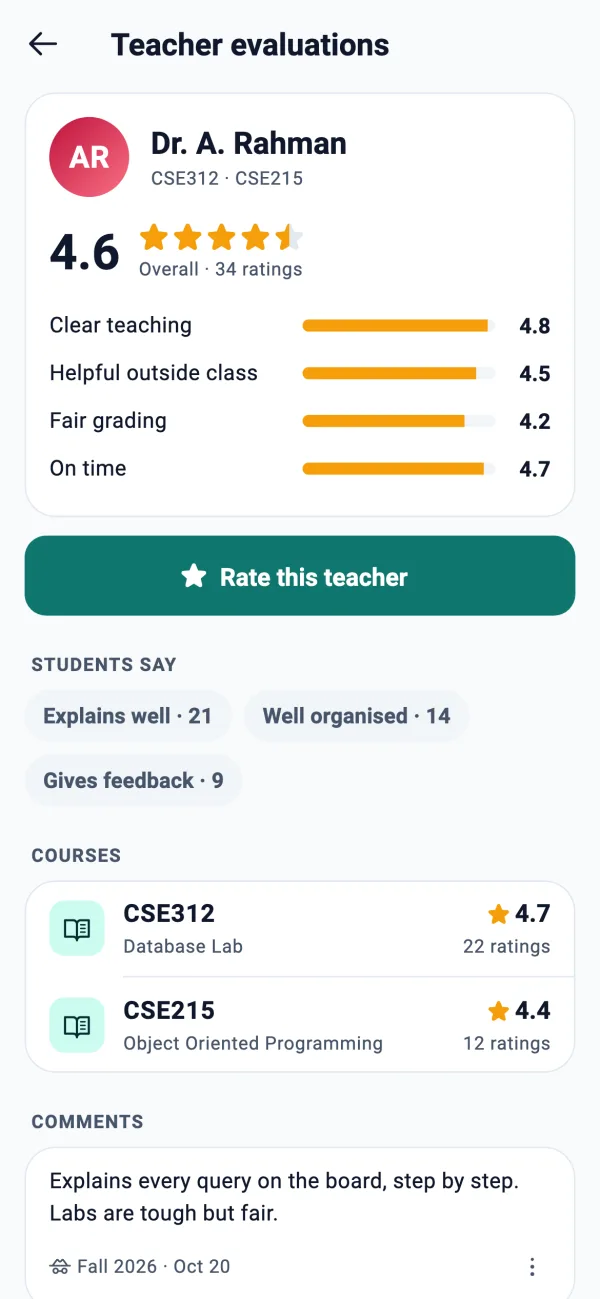
Built to be fair to students and teachers
Only real students of the course
You can rate a teacher for a course only if you are in a class group whose routine has that teacher and that course. No outsiders, no fake accounts.
Anonymous, always
Nobody sees who rated: not students, not CRs, not your university, not the teacher. The team's admin panel shows comment text without names.
Shown only from 3 ratings
A teacher's results appear once at least 3 students have rated. Before that you see “Not enough ratings yet”, so one opinion never defines anyone.
Comments are checked first
An optional comment of up to 300 characters appears only after a moderator approves it. Ratings count at once; comments wait.
Your own university only
You see the teachers of your own university, with their courses and ratings.
No “worst teacher” list
Teachers are sorted by most rated or highest rated only. There is never a ranking of the worst.
What a rating covers
A rating takes about a minute. You rate a teacher for one course in one semester, and you can edit it until the semester changes.
- 1
Five star rows
Overall, Clear teaching, Helpful outside class, Fair grading and On time.
- 2
Up to 3 tags
Pick from a fixed list such as Explains well, Engaging, Gives feedback, Well organised, Tough grader, Heavy workload, Strict attendance and Flexible.
- 3
An optional comment
Up to 300 characters. The app asks you to be fair and specific, with no student names and no insults.
- 4
A clear result
The teacher page shows the overall rating with the count, the four dimension bars, top tags, each course and the approved comments.
Why students use it
Choosing a section, planning a semester and knowing what to expect from a course gets easier when you can see what classmates experienced.
- See a teacher's rating by course, not one number for everything
- Read approved comments from the semester they were written
- Report a comment that is unfair; a few reports send it back for review
- Rate right from your course page in the app
Frequently asked questions
Are teacher evaluations anonymous?
Yes. Nobody can see who rated, including your university and the teacher. The app only remembers that you rated, to stop double rating and let you edit your own rating.
Who can rate a teacher?
A verified student who is in a class group whose routine has that teacher and course. That keeps ratings to people who really attend the class.
Why can't I see a teacher's rating?
Results appear once at least 3 students have rated. Until then the app shows how many ratings there are out of 3.
Can a teacher be rated several times?
Once per student per teacher per course per semester. You can edit your rating until the semester changes.
Are comments moderated?
Yes. A comment shows only after a moderator approves it, and readers can report a comment, which sends it back for review after a few reports.
Is there a list of the best or worst teachers?
Lists sort by most rated or highest rated. There is no ranking of the worst teachers.
Is it free?
Yes. Teacher evaluations are part of the free VarsityKotha app.
More from VarsityKotha
Rate your teachers fairly
Install VarsityKotha, join your class group and give honest, anonymous feedback that helps the next batch.